


_website.jpg)
The Office of the District Attorney, Bronx County is charged with the twin goals of ensuring public safety and striving for equal justice for the over 1.4 million members of the Bronx County community. By “Pursuing Justice with Integrity,” the Office places a focus on assistance for crime victims while simultaneously ensuring fairness to defendants. Moreover, the Office aims to balance the need to seek appropriate punishment for certain crimes while recognizing when punitive measures do not adequately advance justice.


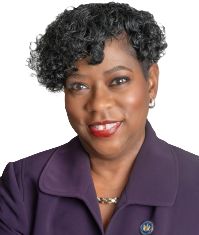
Darcel D. Clark
District Attorney

To change the text size on NYC.gov you can use your web browser's settings. Most browsers include functionality to let you increase or decrease the text on a web page. For example, to increase text size using:
Chrome
In the menu to the right of the address bar, select and set Zoom level. Menu > Zoom > +
Firefox
In the View menu, select Zoom. View > Zoom > Zoom In
Internet Explorer
In the View menu, select Text Size. View > Text Size > Largest
Safari
In the View menu, select Zoom In. View > Zoom In
Macintosh Shortcut: Command+
No Web Browser Endorsement
Common browsers are included in this page; mention of a specific browser does not imply endorsement or recommendation.